
Plotting: scatter plots#
This notebook describes how to create and customize scatter plots.
Note that Osyris’s plotting functions are wrapping Matplotlib’s plotting functions, and forwards most Matplotlib arguments to the underlying function.
[1]:
import osyris
import numpy as np

path = "osyrisdata/starformation"
data = osyris.RamsesDataset(8, path=path).load()
mesh = data["mesh"]
Processing 12 files in osyrisdata/starformation/output_00008
 16% : read      65623 cells,          0 particles
 25% : read      90140 cells,        956 particles
 33% : read     118232 cells,        956 particles
 41% : read     147100 cells,        956 particles
 50% : read     170244 cells,       2109 particles
 66% : read     235859 cells,       2109 particles
 75% : read     260384 cells,       3065 particles
 83% : read     288476 cells,       3065 particles
 91% : read     312840 cells,       4217 particles
Loaded: 340488 cells, 4218 particles.
Basic scatter plot#
The loaded data contains 340,000 cells, and making a scatter plot with 340,000 points is performance draining with matplotlib.
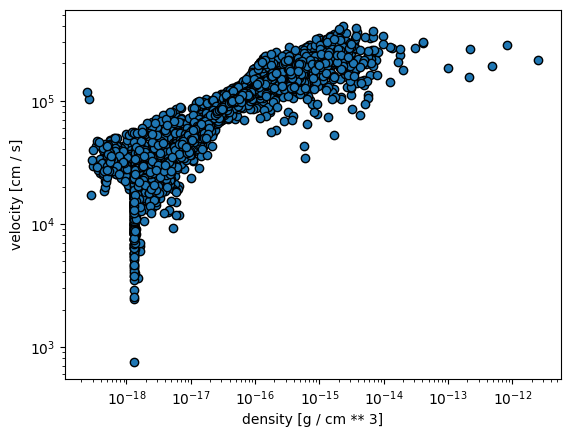
It is thus very common to plot a subset of the cells in scatter plots. Here, we make a scatter plot of density vs temperature, showing only 1 out of 100 cells.
[2]:
step = 100
osyris.scatter(
    mesh["density"][::step],
    mesh["velocity"][::step],
    loglog=True,
)
[2]:
<osyris.core.plot.Plot at 0x7bc779270d30>
Coloring the dots#
Following Matplotlib’s scatter function signature, the color of the dots can be changed using the color argument:
[3]:
osyris.scatter(
    mesh["density"][::step], mesh["velocity"][::step], loglog=True, color="red"
)
[3]:
<osyris.core.plot.Plot at 0x7bc77909b340>

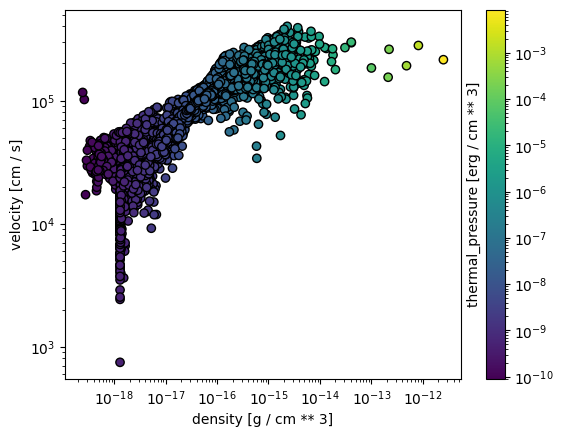
A colormap can also be used to color the dots according to a third quantity, e.g. thermal pressure:
[4]:
osyris.scatter(
    mesh["density"][::step],
    mesh["velocity"][::step],
    color=mesh["thermal_pressure"][::step],
    norm="log",
    loglog=True,
)
[4]:
<osyris.core.plot.Plot at 0x7bc7753fb010>
Point size#
The size of the dots can be changed using the size parameter. The size can either be a single number:
[5]:
osyris.scatter(
    mesh["density"][::step],
    mesh["velocity"][::step],
    size=100,
    norm="log",
    loglog=True,
)
[5]:
<osyris.core.plot.Plot at 0x7bc774d1ca30>

Or it can also be a quantity with physical units
[6]:
v = mesh["velocity"][::step]

osyris.scatter(v.x, v.y, color="red", size=v * 0.02, aspect="equal")
[6]:
<osyris.core.plot.Plot at 0x7bc774548070>
