
Custom datasets#
In the previous notebook, we showed how to load data from a Ramses simulation.
This notebook will show how to create a Datagroup from scratch, using Numpy arrays. This is useful if you want to load data created by a program other than Ramses, for example.
[1]:
import numpy as np
import osyris
from osyris import Array, Vector
Generate Arrays and Vector from random points#
The minimal data needed by osyris to be able to create most plots is:
position: positions in spacedx: cell size (the edge of a cube that represents a mesh cell)any scalar or vector value (we will make a
densityhere)
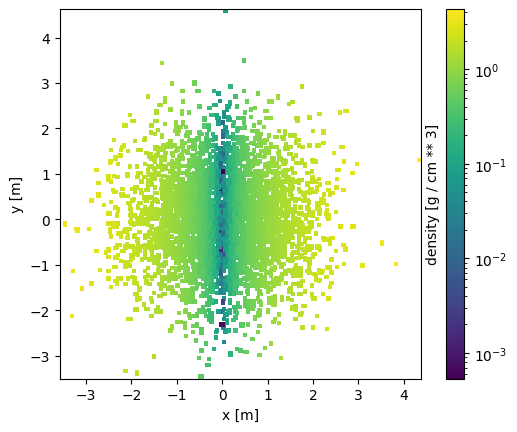
We create x, y, and z positions using ramdon values with a normal distribution, and a unique size for all cells. We also create some fake density values, that correlate to the absolute value of the x position.
[2]:
N = 100_000
x = Array(values=np.random.normal(size=N), unit="m")
y = Array(values=np.random.normal(size=N), unit="m")
z = Array(values=np.random.normal(size=N), unit="m")

dx = Array(values=np.full(N, 0.1), unit="m")

density = Array(values=np.abs(x.values), unit="g/cm^3")

pos = Vector(x, y, z)
We now populate a Datagroup with all 3:
[3]:
dg = osyris.Datagroup(position=pos, dx=dx, density=density)
dg
[3]:
Datagroup:  4.00 MB
'position' Min: 0.016 Max: 5.047 [m] (100000,), {x,y,z}
'dx' Min: 0.1 Max: 0.1 [m] (100000,)
'density' Min: 8.903e-06 Max: 4.330 [g / cm ** 3] (100000,)
Visualization#
We can now visualize the data.
Plotting a map#
To plot a map of the particle densities, use
[4]:
osyris.map(dg.layer("density"), norm="log", direction="z")
[4]:
<osyris.core.plot.Plot at 0x75619208a1a0>
Plotting a histogram#
A one-dimensional histogram is obtained with
[5]:
osyris.hist1d(dg["density"])
[5]:
<osyris.core.plot.Plot at 0x7561a7f74f10>

The rest of the documentation focuses on all the different plotting methods that are available.